
How to add SMS functinality to View360
This document offer information on View360 + Ozeki SMS Gateway Integration. In this example we build a Node.js & React TypeScript app that sends and receives SMS messages through Ozeki SMS Gateway triggered by View360 chat events.
1. What You’ll Build
You will create a middleware application that bridges View360’s chat platform with Ozeki SMS Gateway. The app will:
- Send an SMS when a new View360 chat session is created (e.g., notify the customer that their chat request was received).
- Receive SMS replies from customers via Ozeki webhooks and relay them into the View360 chat as messages from the customer.
- Expose a simple React TypeScript dashboard to trigger test chat sessions and view SMS logs.
2. Architecture Overview
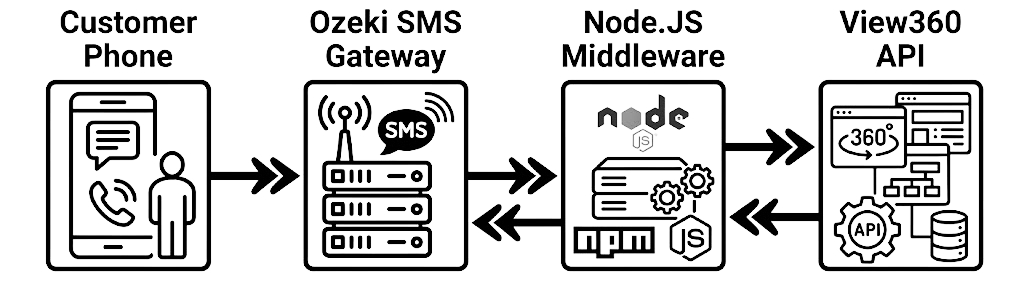
The integration follows a bridge pattern. Neither View360 nor Ozeki knows about each other directly - your Node.js server coordinates both.
Why a middleware?
- View360 provides a chat API (HTTP + Socket.IO) for creating sessions and exchanging messages, but it has no native SMS capability.[reference:0]
- Ozeki SMS Gateway exposes a powerful HTTP API for sending SMS and supports webhooks for receiving them.[reference:1]
- Your middleware translates between the two protocols and keeps credentials secure on the server.
3. Prerequisites
Accounts & Credentials
| Item | Where to get it | Used for |
|---|---|---|
View360 appId |
Your View360 dashboard / onboarding | Authentication header for View360 API calls[reference:2] |
| View360 Base URL | Provided by View360 | Base endpoint for chat API (e.g., https://your-domain.view360.cx) |
| Ozeki HTTP API user | Created in Ozeki Management Console | Username + password for sendmessage and receivemessage[reference:3] |
| Ozeki API URL | Your Ozeki server address | e.g., http://192.168.1.50:9508/api (default port 9508)[reference:4] |
Software
- Node.js 18+ and npm
- Ozeki SMS Gateway installed and connected to a mobile network (or Android SMS Gateway app)[reference:5]
- A publicly reachable URL for webhooks (use ngrok during local development)
4. Project Structure
Create a monorepo-style project with two packages:
view360-ozeki-integration/
├── server/                  ← Node.js + Express (middleware)
│   ├── src/
│   │   ├── index.ts         ← Express app entry
│   │   ├── config.ts        ← Env variables
│   │   ├── view360.ts       ← View360 API client
│   │   ├── ozeki.ts         ← Ozeki SMS client
│   │   └── webhook.ts       ← Ozeki webhook handler
│   ├── package.json
│   └── tsconfig.json
│
├── dashboard/               ← React + TypeScript + Vite
│   ├── src/
│   │   ├── App.tsx
│   │   ├── api.ts           ← Calls to middleware
│   │   └── components/
│   │       ├── NewChatForm.tsx
│   │       └── SmsLog.tsx
│   ├── package.json
│   └── tsconfig.json
│
└── README.md
Initialise the server:
mkdir server && cd server
npm init -y
npm install express cors dotenv axios
npm install -D typescript ts-node @types/express @types/cors @types/node
Initialise the dashboard:
npm create vite@latest dashboard -- --template react-ts
cd dashboard
npm install
npm install axios
5. Configure Ozeki SMS Gateway
Create an HTTP API User
In the Ozeki Management Console, add a new user of type HTTP API. Note the username and password - you’ll need them in your Node.js config.[reference:6]
Note the API Endpoint
The default HTTP API endpoint is http://<ozeki-host>:9508/api.
Replace <ozeki-host> with the IP or hostname of your Ozeki server.[reference:7]
Register a Webhook for Incoming SMS
Ozeki supports webhooks for incoming messages. Register your middleware’s public URL
(e.g., https://your-ngrok-url.ngrok.io/webhook/ozeki) so Ozeki
sends a POST request whenever an SMS arrives.[reference:8]
originator (sender phone number) and messagedata (the SMS text).
6. Node.js Middleware
6.1 Environment Variables
Create server/.env:
PORT=4000

# View360
VIEW360_BASE_URL=https://your-view360-domain.com
VIEW360_APP_ID=your-app-id

# Ozeki
OZEKI_API_URL=http://192.168.1.50:9508/api
OZEKI_USERNAME=http_user
OZEKI_PASSWORD=qwe123
6.2 Ozeki SMS Client
server/src/ozeki.ts - wraps the HTTP API for sending SMS.
import axios from 'axios';

const OZEKI_URL = process.env.OZEKI_API_URL!;
const OZEKI_USER = process.env.OZEKI_USERNAME!;
const OZEKI_PASS = process.env.OZEKI_PASSWORD!;

/**
 * Send an SMS via Ozeki's HTTP API.
 * Docs: https://ozeki-sms-gateway.com/p_5663-http-sms-api-send-sms-example.html
 */
export async function sendSms(recipient: string, message: string) {
  const params = {
    action: 'sendmessage',
    username: OZEKI_USER,
    password: OZEKI_PASS,
    recipient,
    messagetype: 'SMS:TEXT',
    messagedata: message,
  };

  const response = await axios.get(OZEKI_URL, { params });
  return response.data; // XML response with messageid etc.
}

/**
 * Download incoming SMS from Ozeki (polling method – alternative to webhooks).
 */
export async function fetchIncomingSms() {
  const params = {
    action: 'receivemessage',
    username: OZEKI_USER,
    password: OZEKI_PASS,
    folder: 'inbox',
    limit: 10,
    afterdownload: 'delete', // remove from inbox after reading
  };

  const response = await axios.get(OZEKI_URL, { params });
  return response.data;
}action, username, and password.
For sending, use action=sendmessage with recipient,
messagetype=SMS:TEXT, and messagedata.
Message data must be URL-encoded.[reference:9][reference:10]
6.3 View360 Client
server/src/view360.ts - creates chat sessions and sends chat messages.
import axios from 'axios';

const BASE = process.env.VIEW360_BASE_URL!;
const APP_ID = process.env.VIEW360_APP_ID!;

const headers = {
  'app-id': APP_ID,
  'Origin': 'https://view360.cx',
  'Referer': 'https://view360.cx/',
  'Content-Type': 'application/json',
};

/**
 * Create a new View360 chat session.
 * Required: either customerPhone or customerEmail.
 */
export async function createChatSession(params: {
  chatContent: string;
  customerName: string;
  customerPhone: string;
  customerEmail?: string;
}) {
  const url = `${BASE}/convapi/chat-integration/chat`;
  const response = await axios.post(url, params, { headers });
  return response.data;
}

/**
 * Send a message into an existing View360 chat (e.g., relay an SMS reply).
 */
export async function sendChatMessage(chatId: string, content: string) {
  const url = `${BASE}/convapi/customer/message/send`;
  const response = await axios.post(url, { chatId, content }, { headers });
  return response.data;
}app-id, Origin, and Referer headers.
The createChatSession endpoint requires either customerPhone or customerEmail - you can provide both.[reference:11][reference:12]
6.4 Express Server & Webhook Handler
server/src/index.ts:
import express from 'express';
import cors from 'cors';
import dotenv from 'dotenv';
import { sendSms } from './ozeki';
import { createChatSession, sendChatMessage } from './view360';

dotenv.config();

const app = express();
app.use(cors());
app.use(express.json());
app.use(express.urlencoded({ extended: true }));

// ── POST /api/chat ──────────────────────────────────────────
// Called by the React dashboard. Creates a View360 chat session
// and sends an SMS acknowledgement to the customer.
app.post('/api/chat', async (req, res) => {
  try {
    const { name, phone, message } = req.body;

    // 1. Create the View360 chat session
    const chat = await createChatSession({
      chatContent: message,
      customerName: name,
      customerPhone: phone,
    });

    // 2. Send an SMS confirmation via Ozeki
    const smsText = `Hi ${name}, thanks for contacting us! ` +
                    `An agent will reply shortly.`;
    await sendSms(phone, smsText);

    res.json({
      success: true,
      chatId: chat.chatId ?? chat.id,
      smsSent: true,
    });
  } catch (err: any) {
    console.error('POST /api/chat error:', err.message);
    res.status(500).json({ success: false, error: err.message });
  }
});

// ── POST /webhook/ozeki ────────────────────────────────────
// Ozeki posts incoming SMS here.
app.post('/webhook/ozeki', async (req, res) => {
  try {
    const sender = req.body.originator;
    const text   = req.body.messagedata;

    console.log(`Incoming SMS from ${sender}: ${text}`);

    // Relay the SMS into the View360 chat as a customer message.
    // You need the chatId associated with this phone number.
    // In production, look it up from a database.
    const chatId = req.body.chatId || 'demo-chat-id';
    await sendChatMessage(chatId, text);

    res.status(200).send('OK');
  } catch (err: any) {
    console.error('Webhook error:', err.message);
    res.status(500).send('Error');
  }
});

const PORT = process.env.PORT || 4000;
app.listen(PORT, () => {
  console.log(`✅ Middleware running on http://localhost:${PORT}`);
});/api/chat endpoint is your integration trigger. When the React app calls it,
the middleware creates a View360 chat session and immediately sends an SMS confirmation
through Ozeki. The /webhook/ozeki endpoint receives customer replies and
pushes them back into View360.
7. React TypeScript Dashboard
7.1 API Helper
dashboard/src/api.ts:
import axios from 'axios';

const API = 'http://localhost:4000';

export interface ChatPayload {
  name: string;
  phone: string;
  message: string;
}

export async function startChat(payload: ChatPayload) {
  const { data } = await axios.post(`${API}/api/chat`, payload);
  return data;
}
7.2 New Chat Form
dashboard/src/components/NewChatForm.tsx:
import React, { useState } from 'react';
import { startChat, ChatPayload } from '../api';

const NewChatForm: React.FC = () => {
  const [form, setForm] = useState<ChatPayload>({
    name: '',
    phone: '',
    message: 'Hello, I need help with my account.',
  });
  const [status, setStatus] = useState('');

  const handleSubmit = async (e: React.FormEvent) => {
    e.preventDefault();
    setStatus('Sending…');
    try {
      const result = await startChat(form);
      setStatus(
        result.success
          ? `Chat created (ID: ${result.chatId}) and SMS sent!`
          : `${result.error}`
      );
    } catch {
      setStatus('Network error');
    }
  };

  return (
    <form onSubmit={handleSubmit} style={{ display: 'grid', gap: '0.75rem' }}>
      <input
        placeholder="Customer name"
        value={form.name}
        onChange={(e) => setForm({ ...form, name: e.target.value })}
        required
      />
      <input
        placeholder="Phone number (+36201234567)"
        value={form.phone}
        onChange={(e) => setForm({ ...form, phone: e.target.value })}
        required
      />
      <textarea
        rows={3}
        value={form.message}
        onChange={(e) => setForm({ ...form, message: e.target.value })}
      />
      <button type="submit">Start Chat & Send SMS</button>
      {status && <p>{status}</p>}
    </form>
  );
};

export default NewChatForm;
7.3 App Component
dashboard/src/App.tsx:
import React from 'react';
import NewChatForm from './components/NewChatForm';

function App() {
  return (
    <div style={{ maxWidth: 520, margin: '3rem auto', fontFamily: 'sans-serif' }}>
      <h1>View360 × Ozeki SMS</h1>
      <p>
        Create a View360 chat session and automatically send an SMS
        acknowledgement through Ozeki.
      </p>
      <NewChatForm />
    </div>
  );
}

export default App;
8. Complete Flow (Send + Receive)
The diagram below shows both directions: outbound SMS (triggered by a new chat) and inbound SMS (relayed into View360 via webhook).
9. Testing the Integration
Start the middleware
cd server
npx ts-node src/index.tsStart the React dashboard
cd dashboard
npm run devExpose the webhook with ngrok
ngrok http 4000
Copy the ngrok HTTPS URL and register it in Ozeki as your webhook endpoint:
https://<ngrok-id>.ngrok.io/webhook/ozeki.
Send a test chat
Open the React dashboard, fill in a real phone number, and click “Start Chat & Send SMS.” You should receive an SMS shortly. Reply to that SMS from your phone, and the reply should appear in your middleware logs (and be relayed to View360 if you have a valid chatId).
+ sign - but remember to URL-encode it as %2B
if you build the URL manually.[reference:13]
10. Troubleshooting & Tips
| Problem | Likely cause | Fix |
|---|---|---|
| SMS not sending | Wrong Ozeki URL or credentials | Verify OZEKI_API_URL, username, and password. Test with a browser GET request first.[reference:14] |
| View360 API 401/403 | Missing or incorrect headers | Ensure app-id, Origin, and Referer are set exactly as shown.[reference:15] |
| Webhook never fires | Ozeki cannot reach your server | Use ngrok or deploy to a public host. Check Ozeki’s webhook logs for delivery failures.[reference:16] |
| Chat session creation fails | Neither phone nor email provided | View360 requires customerPhone OR customerEmail. Provide at least one.[reference:17] |
| Incoming SMS not relayed to View360 | Missing chatId mapping | Store the association between phone number and chatId when creating the session. |
'demo-chat-id' in the webhook handler with a database
lookup: when you create a chat session, save { phone → chatId }.
When an SMS arrives, look up the chatId by the sender’s phone number.
11. Next Steps & Enhancements
- Add Socket.IO on the server to push incoming SMS events to the React dashboard in real time (View360 itself uses Socket.IO for live chat).[reference:18]
- Persist messages in a database (SQLite, PostgreSQL) so chat history and SMS logs survive restarts.
- Use Ozeki’s
receivemessagepolling as a fallback if webhooks are not available in your Ozeki edition.[reference:19] - Add delivery reports by passing
reporturlto Ozeki’ssendmessageaction, or subscribing to delivery-report webhooks.[reference:20] - Secure the webhook with a shared secret or HMAC signature (Ozeki supports HMAC-signed webhook deliveries).[reference:21]
- Deploy the middleware to a cloud host (Railway, Fly.io, Render) and the dashboard to Vercel or Netlify.
Official documentation links
- Ozeki HTTP API – sendmessage
- Ozeki HTTP API – receivemessage
- Ozeki Webhooks overview
- View360 Chat API (Flutter reference) - useful for understanding endpoint shapes.